How Ecrett Music Can Enhance Your Marketing Strategy Effortlessly
What is Ecrett Music?
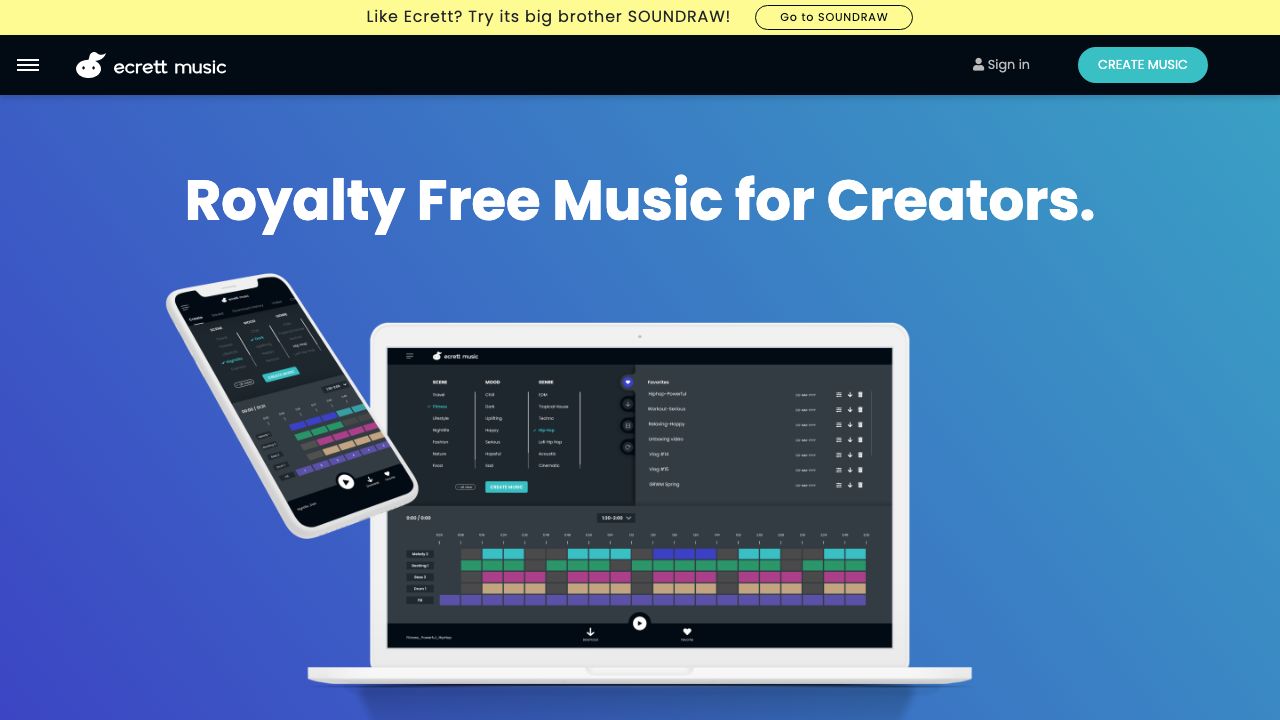
Ecrett Music is a web-based AI music generator that helps creators and marketing teams produce royalty-free background music in seconds. We use it to quickly generate short tracks tailored to a scene, mood, and genre without hiring composers or searching stock libraries. It’s built for video creators, social advertisers, game developers, and small teams that need customizable, copyright-safe music fast. The interface emphasizes “scene-based” creation (choose a scene and mood) so marketers can match music directly to creative assets and pacing. Learn more on the official site: https://ecrettmusic.com.
Key Features and Capabilities
Ecrett is designed around practical controls that non-musicians can use while still delivering meaningful customization.
- ├─
Scene / Mood / Genre presets
- ├─Pick a Scene (e.g., “Explainer”, “Travel”, “Epic”) and then choose a Mood (Happy, Tense, Calm) and Genre (Electronic, Cinematic, Pop). The presets produce instantly listenable options suited to typical marketing scenarios—great for A/B testing creative variants quickly.
- ├─
Length, Tempo, and Instrument selection
- ├─Set exact track length to match your video (e.g., 15s for an Instagram story, 30s for a YouTube ad). Adjust tempo (BPM) to sync with pacing and choose primary instruments (piano, synth, guitar, strings). This helps us get the emotional timing right without manual editing.
- ├─
Instant variations and loopability
- ├─Generate variations of a result to explore subtle changes in arrangement. Many outputs are designed to loop smoothly, which is useful for background beds in presentations or in-game ambience.
- ├─
Export formats and stems
- ├─Download finished tracks as MP3 or WAV. On paid tiers you can often export stems (separate instrument tracks) to remix, duck, or process in your DAW—handy when we need to match vocal levels or add sound design.
- ├─
Royalty-free commercial license
- ├─Generated tracks come with a licensing model suitable for commercial use, removing the risk of copyright claims in ads and product videos. Always verify the license terms for specific enterprise requirements.
Practical example: for a 30-second product demo, we set Scene = “Explainer,” Mood = “Confident,” Duration = 30s, Tempo = 100 BPM, swapped synths for acoustic guitar, generated 5 variations, picked the best take, downloaded WAV, and used the stems to duck under narration.
Getting Started
- ├─Sign up and verify your account on https://ecrettmusic.com. We recommend a paid trial if you plan to use tracks commercially.
- ├─Click “Create” and choose a Scene that best matches your content type (Explainer, Trailer, Promo).
- ├─Set Mood and Genre—use Mood to reflect messaging (e.g., “Uplifting” for product launches, “Suspense” for tease trailers).
- ├─Define Duration to match the final cut length. Tip: add 1–2 seconds extra for fade handling in your editing software.
- ├─Tweak Tempo and Instruments if needed—slower BPM for emotional scenes, faster for high-energy ads.
- ├─Generate multiple variations, preview inline, and mark favorites to add to your project library.
- ├─Download the chosen track (WAV recommended for mastering). If available, export stems to balance music and voiceover in your video editor.
- ├─Check the license panel and export paperwork for commercial use. Store the license copy with the creative asset for legal audits.
Real-World Use Cases
- ├─Social ad production: We generate multiple 15–30s tracks with different moods to A/B test creatives on platforms like Instagram and TikTok. The quick generation time lets us iterate on messaging without expensive music sync licensing.
- ├─Explainer videos and product demos: For SaaS demos, we produce background beds that support voiceover. Exporting stems lets us duck music under narration for clarity while keeping the emotional lift.
- ├─Game prototypes and indie titles: For early builds, Ecrett provides loopable atmospheres and scene-specific tracks so teams can focus on gameplay before commissioning a composer. It’s ideal for rapid prototyping of levels and menus.
Pros and Cons
Advantages:
- ├─Rapid creation workflow tailored for video lengths and use-cases.
- ├─Scene/Mood/Genre controls make it easy for non-musicians to get usable results quickly.
- ├─Commercial, royalty-free licensing reduces legal friction for marketers.
- ├─Export options (MP3/WAV and, on paid plans, stems) support post-production workflows.
Limitations:
- ├─Musical complexity can feel formulaic—tracks may lack the nuanced dynamics of a bespoke composition.
- ├─Limited advanced editing (no piano-roll or deep arrangement tools); heavy customization requires external DAW work.
- ├─Quality can vary by genre—some cinematic or highly organic arrangements may need additional human mixing.
How It Compares to Alternatives
Ecrett competes with tools like Soundraw (https://soundraw.io) and Amper Music (https://www.ampermusic.com). Compared to Soundraw, Ecrett emphasizes scene-driven presets and a simpler UX geared to video marketers, while Soundraw provides deeper musical customization. Amper (now part of larger ecosystems) has stronger integration options for production workflows. For marketers who prioritize speed and straightforward licensing, Ecrett’s approach often wins.
Pricing and Value
Ecrett offers a free tier for testing and paid subscriptions that unlock higher-quality downloads, WAV/stem exports, and commercial licensing. Pricing is subscription-based (monthly/annual) and typically scales for teams. For most marketing teams, the time saved producing licensed music and the ability to iterate fast makes the subscription a cost-effective tool compared to commissioning custom tracks.
Final Verdict
We recommend Ecrett Music for marketing teams and content creators who need fast, royalty-free music that’s easy to customize and integrates quickly into video workflows. It’s ideal for social ads, explainer videos, and prototypes. If you need highly original, cinematic scoring or deep composition control, pair Ecrett outputs with a composer or DAW for refinement. Explore it at https://ecrettmusic.com and run a short project to see how it fits your production pipeline.